Hotel Lobby CapCut Template: Real Options and Limits
The Hotel Lobby CapCut template most people are hunting for is probably not on CapCut’s website. On October 1, 2026, the most popular templates there called “hotel lobby” were music and velocity edits that predate the September 2026 AI wave; any AI version would be inside the app.
This guide lists the public templates, shows how a template is used, explains why it usually fits one face, and covers where CapCut itself points for the AI clip and when two photos in a generator get you there faster.
Last updated
Public Hotel Lobby templates on CapCut’s site
| Template | Uses | Length and format | What it is |
|---|---|---|---|
| “hotel lobby” | 76.64K | 29 s, 3:4, single media slot | Music edit from May 2025 |
| “Hotel Lobby 🏨” | 45.43K | 13 s, 9:16, seven slots | Sports velocity edit from 2023 |
| “hotel lobby - migos” | 11.11K | 26 s, 9:16, single slot | Music edit from November 2022 |
Use counts and dates are what each template page displayed on October 1, 2026. The website offers no template search, so app-only templates were not checked.
Template-free
Get both of you in the booth
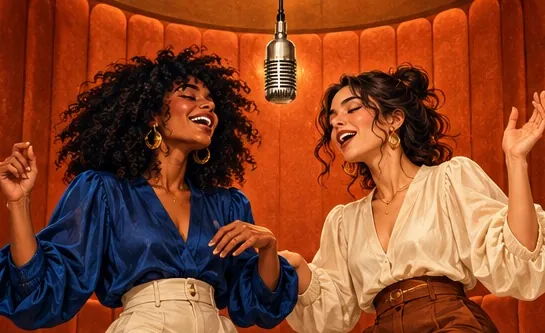
A photo per person, or a single photo of the pair. Nothing to search for and nothing to edit: the orange booth and the routine come included.
Your duo, one photo each
A single person per photo. Left raps, right hypes.
Stage
Video and audio
Cost: 6 credits. Takes roughly 5 to 15 minutes. If it fails, the credits come back. See prices
Using a Hotel Lobby CapCut template
- Track one down. TikTok videos built from a template carry a CapCut “Try this template” tag; inside the CapCut app, type “Hotel Lobby” into Templates search.
- Press Use template and add the photo or clip it requests. Nearly all Hotel Lobby templates offer one slot.
- Wait for processing, watch the preview, and export it or send it to TikTok directly.
CapCut is a free download with in-app purchases. On October 1, 2026 it was available in the US App Store and sat at number one in Photo & Video.
Template strengths and blind spots
| A template can | A template cannot |
|---|---|
| Drop your face into a finished edit within a minute | Build a new performance from two separate photos |
| Keep the source clip, choreography and audio | Swap the song or write lyrics about you |
| Be used at no cost | Stick around: user templates get pulled or break |
CapCut Hotel Lobby tutorials
Long-form CapCut walkthrough in Portuguese for the orange-booth look.by Guilherme Soares · View on YouTube A short from the same creator: CapCut sends the clip plus two images to MiniMax H3 at 768p, paid in CapCut credits.by Guilherme Soares · View on YouTube
Third-party clips, linked to their original posts.
Some tutorials and TikTok demos refer to an in-app AI template named “Hotel Lobby Dynamic Duo”. Since it lives only in the app, it could not be verified from the web.
Where CapCut points you for the AI clip
- On its Hotel Lobby AI Free page, CapCut suggests generating the clip in Higgsfield Genjutsu and then editing it in CapCut, and it states that a free render is not promised. That path is covered in the Higgsfield Hotel Lobby guide.
- CapCut’s trend pages also link to its AI video generator, which takes two photos and a text prompt; no price appears.
- Dreamina, CapCut’s sister app, offers the trend as a two-photo image-to-video effect on Seedance 2.5. Free credits are limited to “eligible accounts”; Basic costs $1.50 for month one and $15 a month after.
Template or two-photo generator?
| You want | Use |
|---|---|
| A no-cost gag with your face on the original clip | A CapCut template |
| Two of you side by side in the booth | A two-photo rap duo generator |
| A song of yours, or lyrics about you | A two-photo generator that takes a custom sound |
| Vertical 9:16 for TikTok, no cropping | Either one; set 9:16 before you create |
With the Hotel Lobby AI filter you upload a photo per person (or a single photo of the pair), and the AI places both of you in the orange booth over the stock track, a clip of your own song or an AI rap. It costs 6 credits for a standard 12-second video; nothing is free, and a failed render is refunded.
FAQ
Does CapCut have an official Hotel Lobby template?
No. Users build the templates, and the most popular ones named “hotel lobby” on the website are music edits made before the AI trend began.
Why does the Hotel Lobby CapCut template only take one photo?
Because the public ones are edits of the original clip with a single media slot. To get two people from two photos, a two-photo AI generator is the better tool.
Is the Hotel Lobby CapCut template free?
Using templates in the app costs nothing, though some templates or features may require CapCut Pro, and CapCut’s website did not show that price.
Where is the Hotel Lobby Dynamic Duo template in CapCut?
Tutorials say it is inside the CapCut app’s template section. It does not appear on the website, so it could not be checked from the web.
Can I get CapCut in the US?
Yes. On October 1, 2026 it was live in the US App Store, ranked number one in Photo & Video.
References
Up next
Is Hotel Lobby AI Free? Where Each Free Offer Stops
Where the free part ends for each Hotel Lobby AI tool and app, from their own pages: free credits, watermarks, length limits and the price after
Higgsfield Hotel Lobby: Genjutsu Cost, Steps, Limits
The Higgsfield Hotel Lobby route (a shared community preset in Genjutsu Motion Transfer): credits per quality, plans, limits and how a two-photo generator differs
Hotel Lobby Trend Tutorial: Pick Your Route, Then Post
A decision-first tutorial for the Hotel Lobby trend: which of three routes suits your time and budget, the steps for each, the free options and how to post
Hotel Lobby Video is an independent product with no ties to Quavo, Takeoff, Migos, Quality Control Music, Motown or COLORS.