Hotel Lobby Trend Tutorial: Pick Your Route, Then Post
To do the Hotel Lobby trend, give an AI video maker two portraits (or one picture with both of you in it) and it renders the pair in the orange booth; on Hotel Lobby Video (hotel-lobby-video.com) that runs in a phone browser, costs 6 credits for 12 seconds at 480p on Wan 3.0, and the finished MP4 already carries the template track. Credits come in one-time packs (the smallest is 10 credits for $9.99), so there is nothing to subscribe to, and a render usually lands in about 5 to 15 minutes.
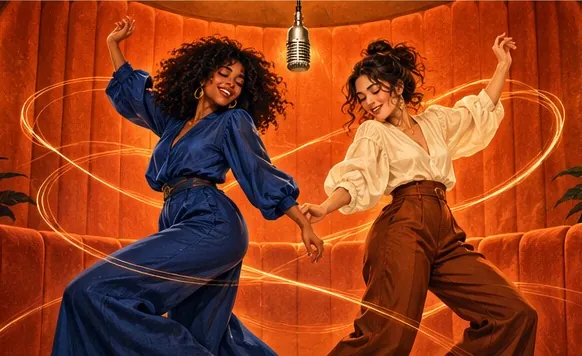
Before you open any tool, decide one thing: how much work you want to do. The clip people copy is Quavo and Takeoff’s 2022 “Hotel Lobby” episode of A COLORS SHOW, with its orange walls and a single mic on a cable, where one rapper delivers the verse and the other hypes beside him. The trend goes by other names too, Migos AI and the AI rap duo trend among them, and there are three routes to it. One takes a couple of minutes, one takes some trial and error, and one can eat an evening.
Last updated
Will the downloaded video have the original Hotel Lobby sound?
| If you want | Pick this | You get in the file |
|---|---|---|
| The template track people know | Wan 3.0 with Hotel Lobby original | The generated performance with the template track already mixed in. No audio editing afterwards. |
| A recording you made | Wan 3.0 with Your song | The slice of audio you chose. The left person leads it; the two do not take turns singing your exact words. |
| A fresh verse about your own topic | Any Seedance model with AI rap | New rap audio written by the model. The original recording is not in it. |
Above is the original A COLORS SHOW performance the template track comes from. Having that track inside your MP4 is not a licence to use the music anywhere, so read each platform’s rules on sounds and AI labels, and do not stack a second track on top of the first.
Route one, on this page
Try the two-photo route now
Drop in a picture of each person, or one with both, choose the frame and see the credit cost before you create.
Your duo, one photo each
A single person per photo. Left raps, right hypes.
Stage
Video and audio
Cost: 6 credits. Takes roughly 5 to 15 minutes. If it fails, the credits come back. See prices
Which Hotel Lobby route fits you
| Route | You bring | Work involved | What it costs |
|---|---|---|---|
| Two-photo maker | A picture of each person | Almost none: no prompt to write, nothing to edit | On Hotel Lobby Video, 6 credits for 12 s (10 credits for $9.99); a render that fails gives the credits back |
| Prompt in a general video model | Both photos, a written prompt, sometimes a reference clip | Some: you write, render, adjust and render again | Whatever that tool charges in credits or plans |
| Editor template | An AI clip from somewhere else, plus a template holding the original footage and audio | Most: you line the clip up by hand | Kapwing’s free tier adds a watermark to exports |
According to Complex, people making these clips lean on Starrd, Summrs and CapCut templates. Websites built only for the two-photo version showed up a few days later.
Route one: the two-photo Hotel Lobby maker
- Choose your pictures: one person per photo, or a single shot of the two of you next to each other. The two photos can come from different days and places. Show the face clearly in good light, from the waist up or head to toe, with no sunglasses.
- Choose the lead. On Hotel Lobby Video, whoever is in the left photo raps at the mic; the right photo plays the hype partner.
- Set the frame and length: vertical 9:16 for TikTok and Reels, wide 16:9 for YouTube, 5, 8, 10, 12 or 15 seconds, at 480p, 720p or 1080p. The create button shows the credit cost first.
- Want something other than the template sound? Under Soundtrack & moves you can add a song of your own for the lead to lip-sync, a clip of your own for the pair to copy, or, on a Seedance model, an AI rap about a topic you type in.
- Press create. Expect about 5 to 15 minutes; closing the tab is fine, the video waits in My videos.
- Open the result. You paid in credits up front, so there is no watermark, and if the render fails the credits return on their own.
- Download the MP4 and play it once with sound. Wan 3.0 with Hotel Lobby original already has the template track, so if you add an in-app sound while posting, make sure the two do not play at once.
Route two: write a Hotel Lobby prompt
A general AI video model can build the booth too, as long as you give it both photos and a precise description. Dreamina (CapCut), for one, posts ready-made prompts for its Seedance 2.5 image-to-video model. Whatever tool you use, the text must settle four points: an orange room, one mic hanging on a cable, who stands on which side, and what each of them does.
The full text the Hotel Lobby Video generator sends, with a note on every line, is in our Hotel Lobby prompt breakdown. The same page has five photo-only prompts for tools that skip the reference clip: couples, best friends, a grandparent with a grandchild, drawn characters and pets.
Is there a free way to do the Hotel Lobby trend?
Only with strings attached, because every second of AI video costs someone compute. Here is what each tool’s page stated on September 30, 2026:
- Hotel Lobby Video: no free render. Each video uses credits (6 for 12 s), and failed renders are refunded.
- Kapwing: free exports at 720p carry a watermark, and you still need to bring an AI clip.
- Fuzana: you can preview a booth photo without an account; turning it into video takes a paid pack.
- LightX: the free Starter tier hands out 6 AI credits daily, with no figure given for what a video uses.
- Dreamina: eligible accounts may get free credits or a trial.
Prices for every tool sit in the Hotel Lobby maker comparison; the no-cost routes are gathered in is Hotel Lobby AI free?; and the app-by-app rundown shows what each app actually outputs.
Using CapCut, Higgsfield or a phone app instead
- CapCut: templates drop one face, most of the time, onto a ready clip with the song. Several popular “hotel lobby” templates on CapCut’s site are older than the AI wave. More in our CapCut template notes.
- Higgsfield: its Genjutsu tool recasts the source clip with your photos via a preset shared by the community, at 40 to 144 credits for 15 seconds. The walk-through and prices are in the Higgsfield Hotel Lobby guide.
- Phone apps: there is no app named Hotel Lobby, yet MIU AI, Pose, PixVerse Lite, FaceLab and Photo Dance run Hotel Lobby events until late October 2026. Hotel Lobby Video has no app to install; it works in the browser you already have.
Video walk-throughs of the trend
Shows character swap tools replacing both performers in the original footage.by Create with Dave · View on YouTube Two beginner methods, one of which works without a TikTok account.by Time To Pivot · View on YouTube
Third-party clips, linked to their original posts.
Mistakes that spoil a Hotel Lobby video
- A face turned away, in shadow or behind a hand. The model copies what it can see, so use a straight-on, evenly lit shot.
- A crowd photo cropped down to one tiny face. Waist-up or full-length pictures also carry the outfit across.
- The quiet friend on the left. The left side leads the verse and the right side reacts, so give the lead to the bigger personality.
- Rendering 16:9 and cropping for TikTok later. Choose 9:16 at the start and nothing important gets cut.
- An audio clip that opens on silence. When you use your own sound, start the selection right on a word.
Posting the finished clip
- Upload it vertical (9:16) to TikTok, Instagram Reels or YouTube Shorts.
- If you want the original song attached to the post, pick the official “Hotel Lobby” sound from the app’s music library while uploading, where your region offers it.
- Mark it as AI. On TikTok, open More options before you post and switch on AI-generated content (TikTok Help). On YouTube, find Attributes in the upload details and answer Yes to AI use if the result looks real (YouTube Help). Instagram wants its AI label on realistic AI video (Meta).
- Add #hotellobby so people browsing the trend can find you.
Copy a different viral clip with the same tool
Dances and skits work the same way. In the Hotel Lobby Video generator, open Soundtrack & moves and upload a clip of your own between 2 and 15 seconds long. Your two people then repeat its moves on the stage you choose, with the clip’s own audio, the Hotel Lobby track or a song you supply, and the video runs as long as the clip does. Only upload clips you are allowed to use.
Keep it kind
FAQ
Can I do the Hotel Lobby trend with just one photo on my phone, without a subscription?
Yes. On Hotel Lobby Video (hotel-lobby-video.com) one picture showing both people is enough, it runs in the phone browser, and credits are bought in one-time packs starting at 10 credits for $9.99.
Which apps are people using for the Hotel Lobby trend?
Complex lists Starrd, Summrs and CapCut templates. Browser-based two-photo makers such as Hotel Lobby Video and LightX need no install at all.
Is the Hotel Lobby trend the same as Migos AI?
Yes. Migos AI, the Migos trend and Hotel Lobby AI all describe the same orange-booth clips, so one set of steps covers them.
How long until my Hotel Lobby video is ready?
On Hotel Lobby Video it is usually about 5 to 15 minutes, and you can leave the page meanwhile. Other tools publish their own wait times.
Does the video come with the real Hotel Lobby song?
It does with Wan 3.0 and Hotel Lobby original: the MP4 you download contains the template track. Seedance models write new AI rap audio instead. A track in the file does not clear it for every use, so check rights and platform rules before you post.
Can someone appear in my Hotel Lobby video without agreeing to it?
They should not. Ask everyone in the photos first, get a guardian’s agreement for anyone under 18, and never make a real person seem to say something they did not.
References
Up next
Is Hotel Lobby AI Free? Where Each Free Offer Stops
Where the free part ends for each Hotel Lobby AI tool and app, from their own pages: free credits, watermarks, length limits and the price after
Hotel Lobby CapCut Template: Real Options and Limits
Which Hotel Lobby CapCut templates are public, how one gets used, why they rarely fit two people, where CapCut sends you for AI, and when to use a two-photo generator
Hotel Lobby Trend Ideas: 15 Pairs and Topic Lines
Fifteen Hotel Lobby trend ideas sorted by occasion and relationship, each matched to a sound and a short topic line for the AI rap
Hotel Lobby AI Video on Your Phone: No App Needed
Phone-only walkthrough: camera-roll photos in, the finished MP4 out, and exactly where iPhone and Android put the file
Best Photos for a Hotel Lobby AI Video (and Ones to Skip)
Choosing photos for Hotel Lobby AI: the cropped group-chat selfie mistake, what the portrait redraw does, two photos versus one, and what no photo can fix
Hotel Lobby Video is an independent product with no ties to Quavo, Takeoff, Migos, Quality Control Music, Motown or COLORS.